 NoiseKill
AI noise remover for Android
Make noisy recordings sound clean.
NoiseKill removes wind, traffic, fan hum and background chatter from any video or voice recording, and keeps the voice sounding natural.
- 100% on your phone
- No upload
- No account
- No watermark
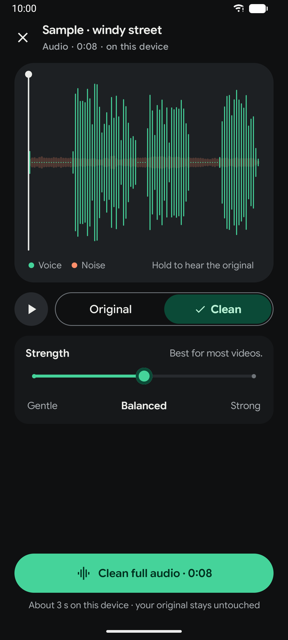
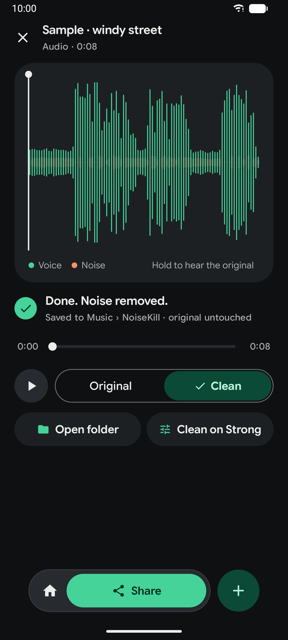
Hear it before you commit
A real-time preview lets you flip between Original and Clean, so you know exactly what you'll get before cleaning the whole file.
- Pick a video or audio fileA vlog, a voice memo, a lecture, an interview.
- Preview and choose a strengthSwitch between Original and Clean, then pick Gentle, Balanced or Strong. A light rustle needs a different touch than a loud fan.
- Clean and shareYour cleaned copy is saved to Movies or Music, ready to share. The original file is never touched.
What it takes out
NoiseKill uses a deep-learning model trained to separate a voice from everything around it.
- Wind
- Fan & AC hum
- Traffic & street sounds
- Static & hiss
- Crowd & café chatter
Works with MP4, MOV, MKV, MP3, WAV and M4A. On a video, the picture stays exactly as it was and only the sound is cleaned.
Private by design
The cleaning happens on your phone, so your recordings never leave it.
Nothing is uploaded
No cloud server ever receives your video or audio.
Works offline
No internet connection is needed to clean a file.
No account
Open the app and start. There is nothing to sign up for.
Your original stays safe
NoiseKill always saves a new copy and leaves your file alone.
Free to use, with a small ad while a file is cleaning. Read the privacy policy.
On every screen you own
NoiseKill adapts to phones, foldables, tablets and Chromebooks, and also runs on Android TV. Missing a file type you need? Tell us which one.
Try it on a noisy clip
There's an 8-second sample built in, so you can hear the difference before you pick a file of your own.